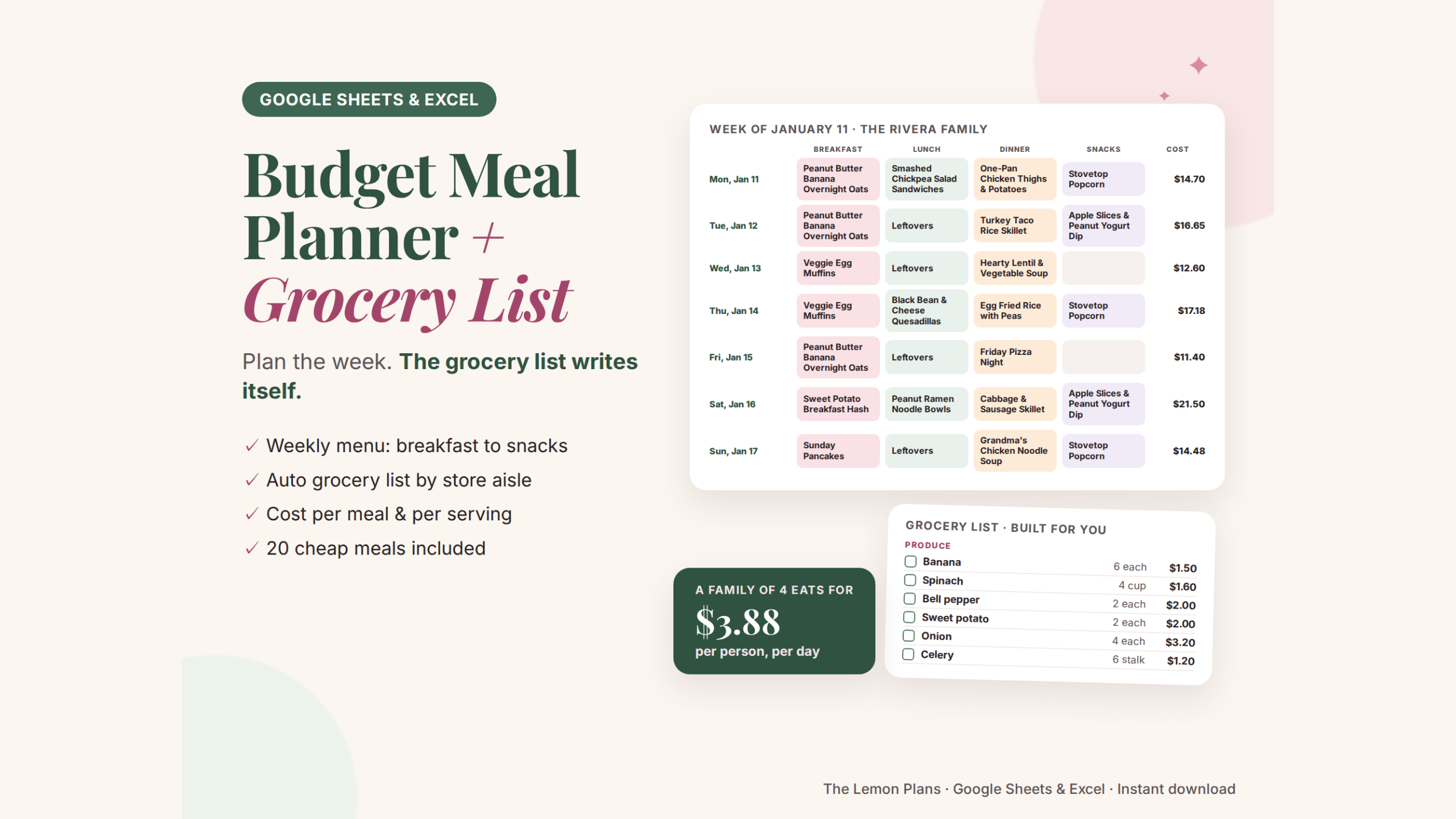
Plan the week. The grocery list writes itself.
A weekly meal plan for the whole family, a grocery list that adds up every ingredient for you, and a grocery budget you can actually stick to.
- Weekly menu: breakfast, lunch, dinner and snacks
- Auto grocery list grouped by store section
- Cost per meal and per serving, 20 cheap meals included
- As a spreadsheet, a grocery list app, or both (choose your format)
Everything for easy, cheaper weeks
Built for busy families: plan once on Sunday, shop once, waste less.
Weekly menu
Pick breakfast, lunch, dinner and snacks for every day from your own Meal Bank.
Automatic grocery list
Every ingredient the menu needs, added up across meals and grouped by store section.
Meal bank
Your family's meals with ingredients, servings and real costs.
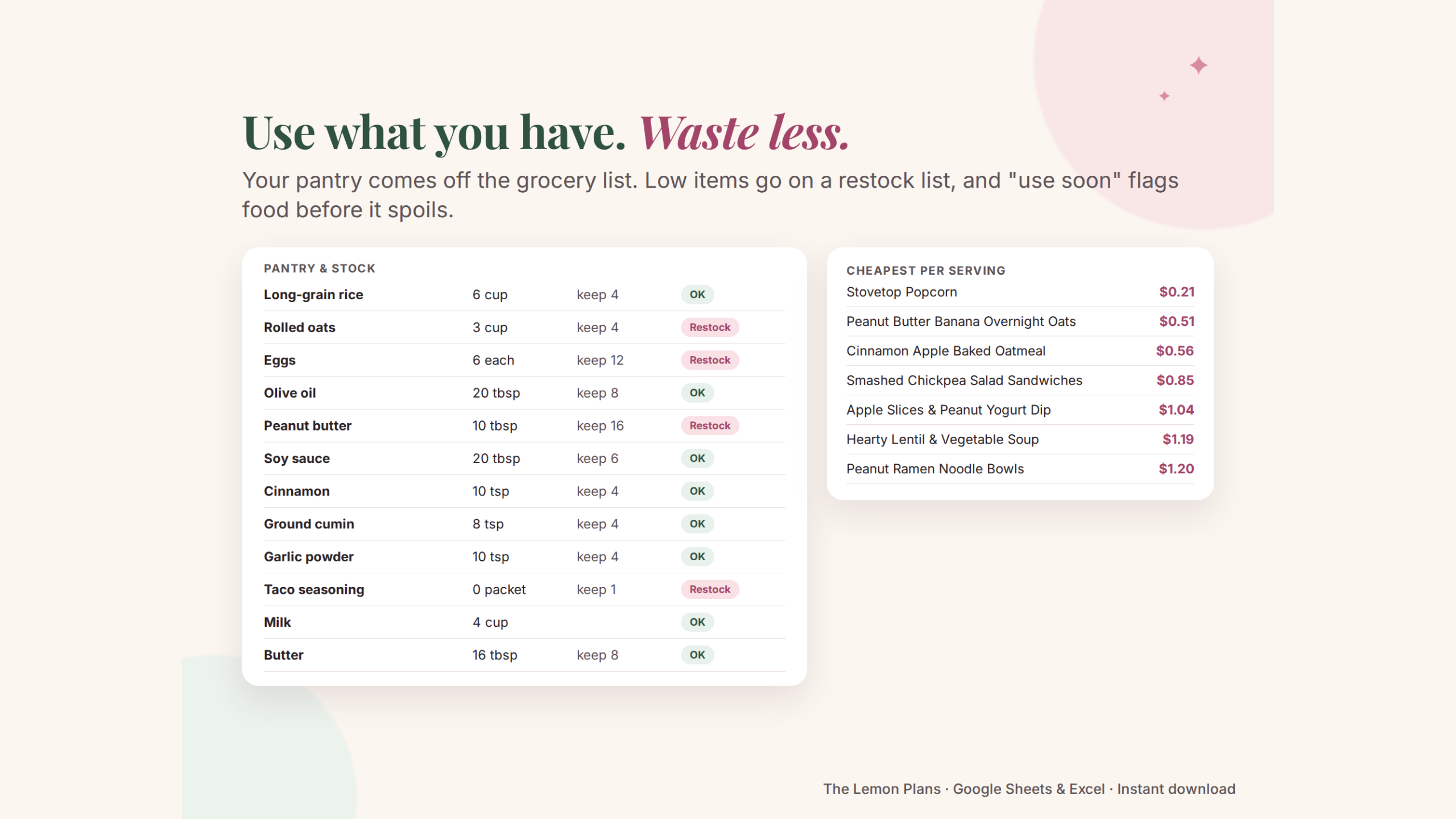
Cost per serving
See what each meal costs per plate, and your cost per person per day.
Pantry & stock
What you have comes off the list. Low items go on a restock list.
Grocery budget
Log each trip and see budget, spent and what's left every month.
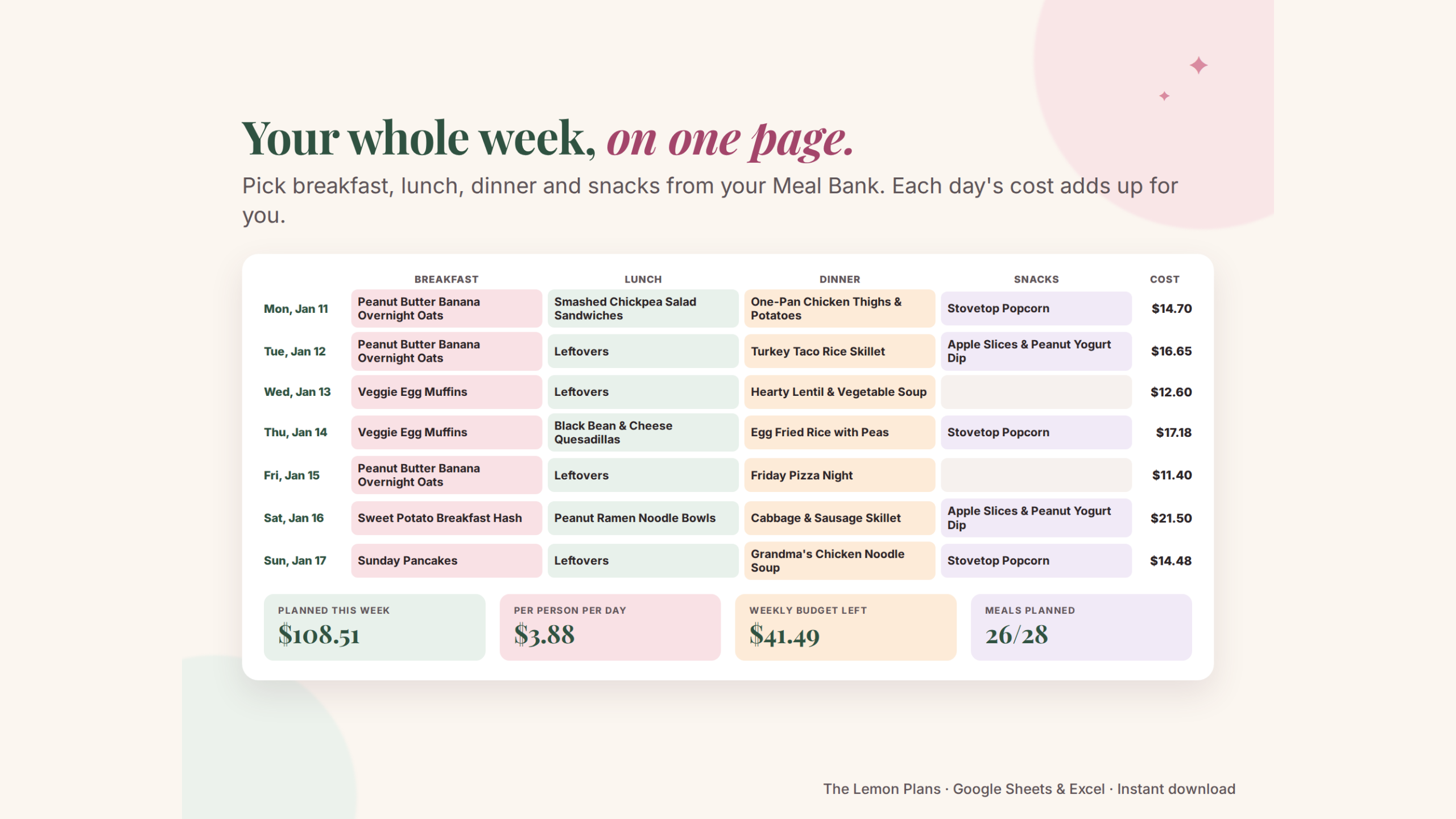
Your whole week, on one page
Choose a meal for each slot from a dropdown. Leftovers cost $0. The day and the week add up, compared with your weekly grocery budget.
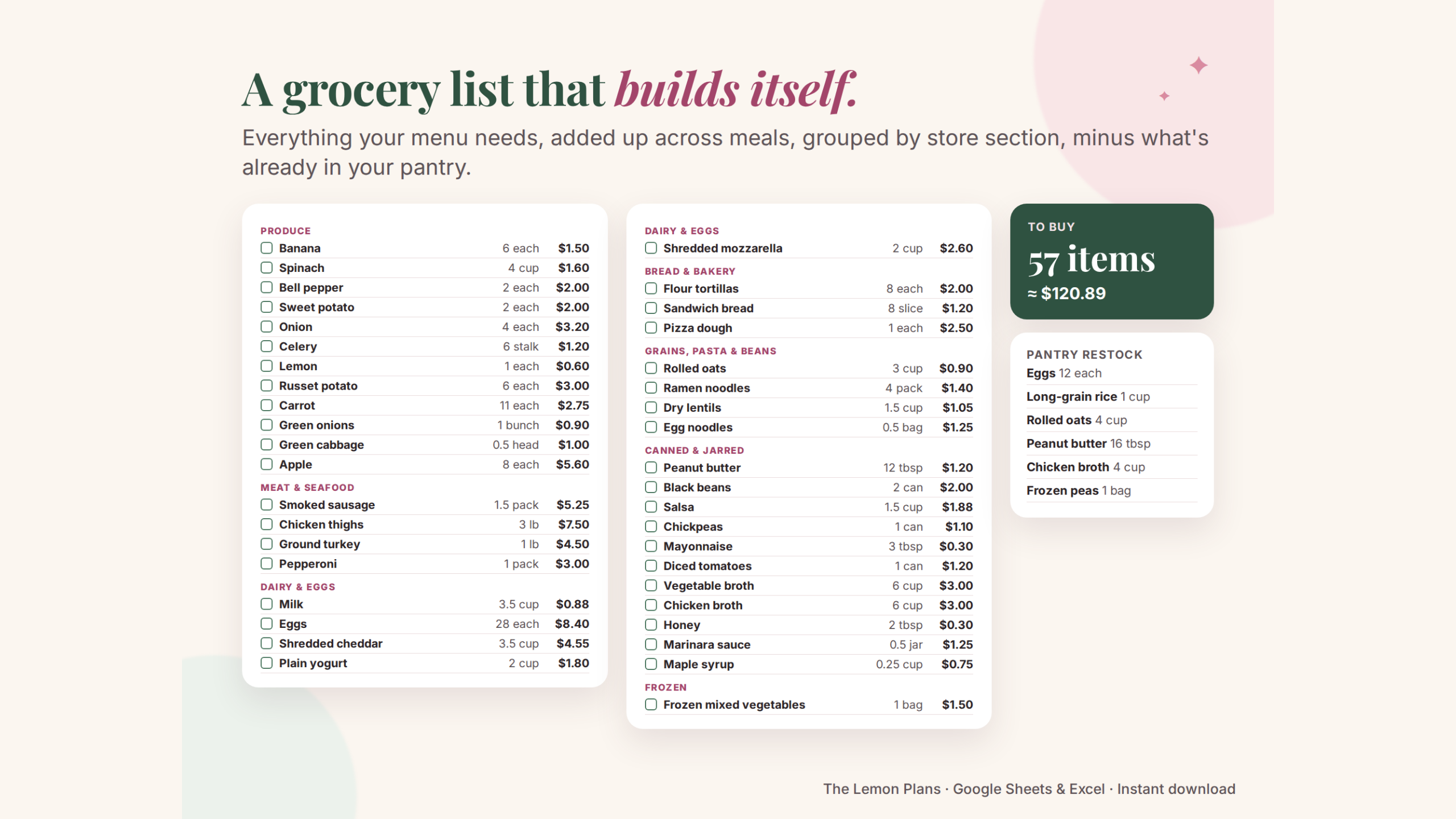
A grocery list that builds itself
Onions from three recipes become one line. Items are grouped by store section, in the order you walk the store, and what's already in your pantry is taken off.
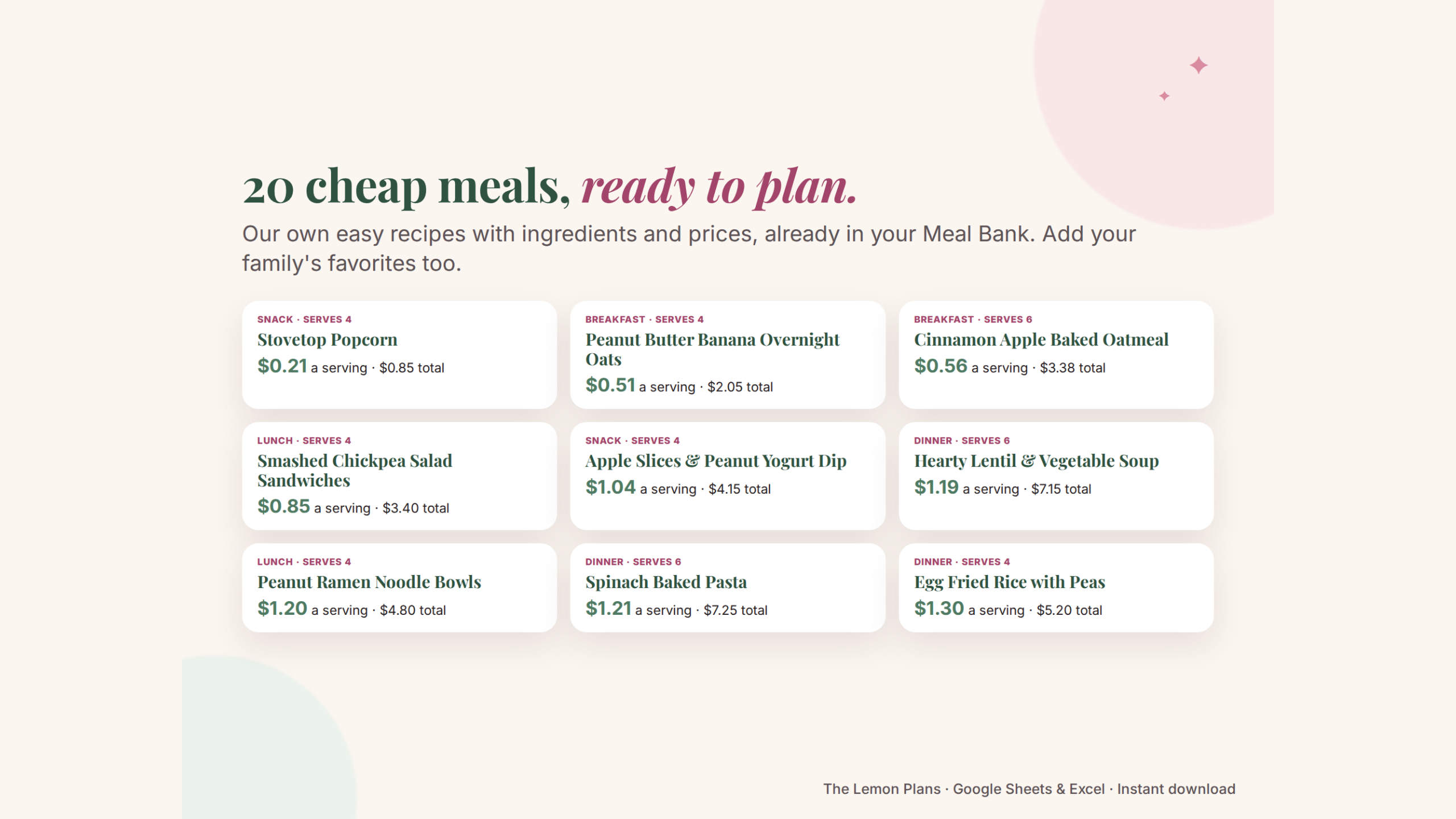
Plan my week →20 cheap meals, ready to plan
Overnight oats, quesadillas, lentil soup, sheet-pan dinners and more: our own short recipes with ingredients and prices, already in your Meal Bank.
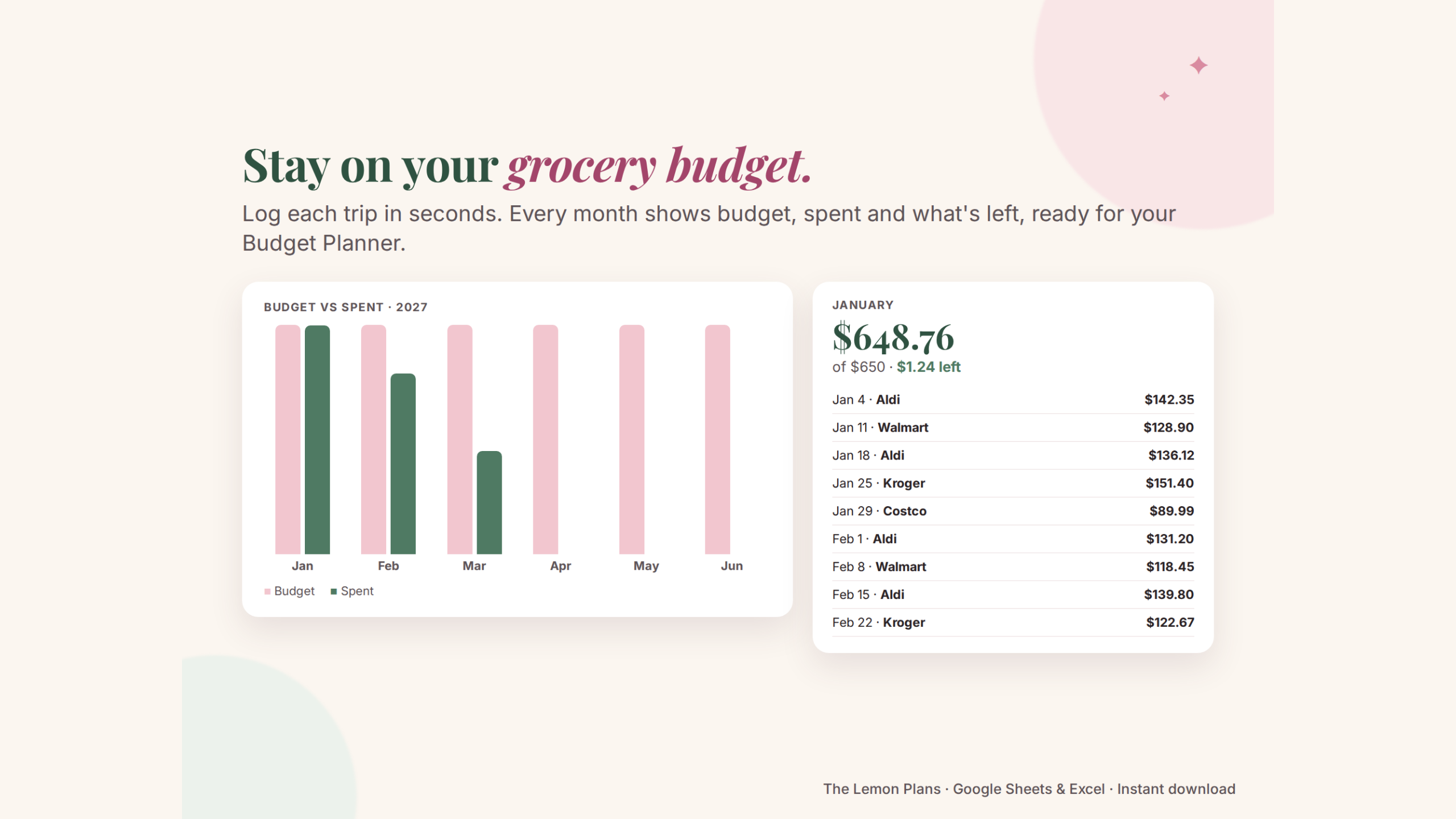
Stay on your grocery budget
Type the date, store and amount after each trip. Every month shows budget, spent and what's left, ready for the Groceries line of your Budget Planner.
Use what you have. Waste less.
Keep track of what's in the pantry, what to restock and what to use soon, so food gets eaten instead of thrown away.
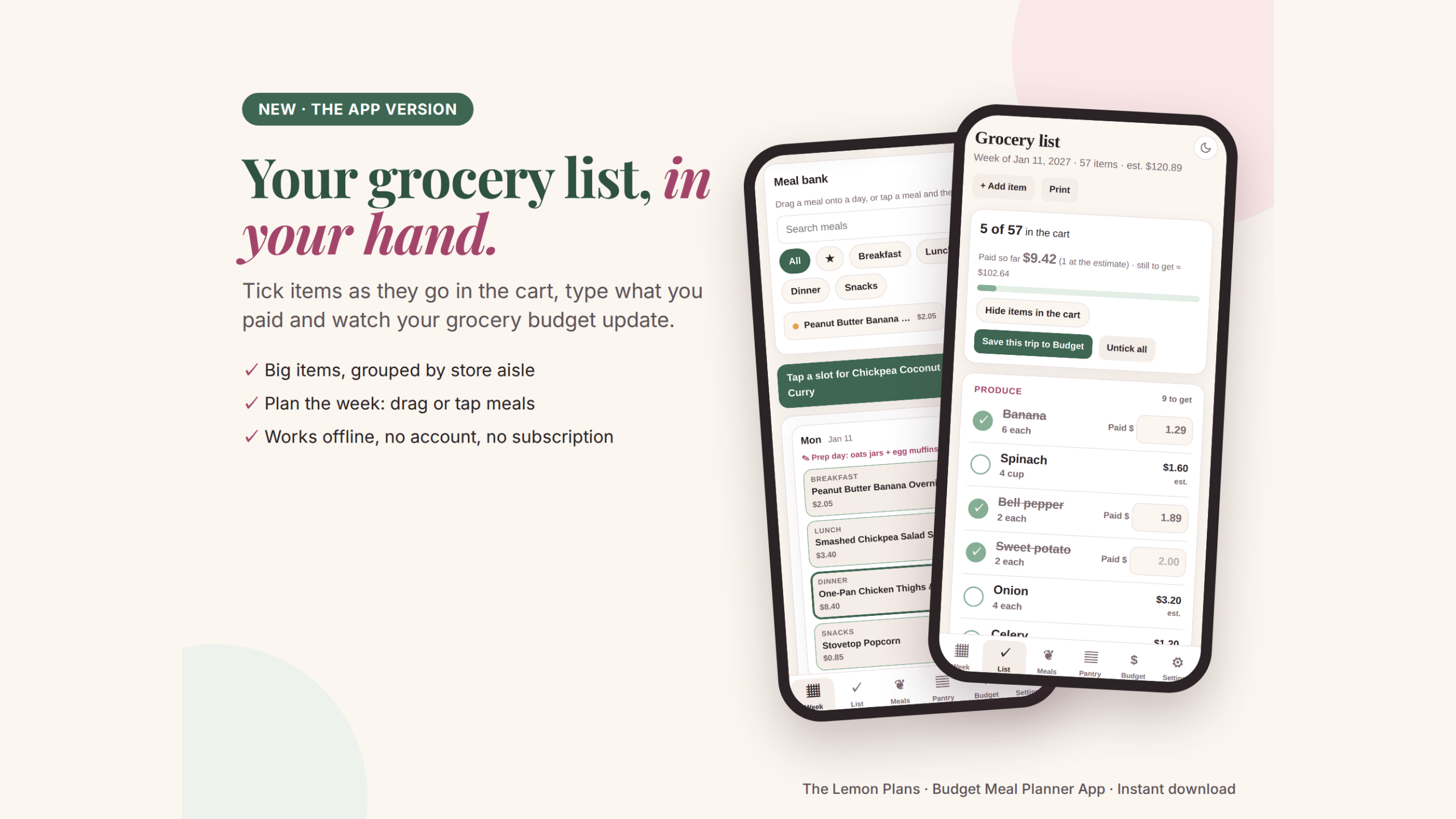
A grocery list app you tick off in the store
The Budget Meal Planner App is one file that opens in your browser, with big items grouped by store aisle. Tap an item as it goes in the cart, type what you paid, and your grocery budget updates. It works offline: no account, no subscription.
- Drag meals onto the days (on a phone: tap a meal, then a slot)
- The same math as the spreadsheet: list added up, minus your pantry
- "Start next week": copy the menu or start fresh
- Price paid goes to your monthly grocery budget
- Backup & restore, CSV export, light and dark mode
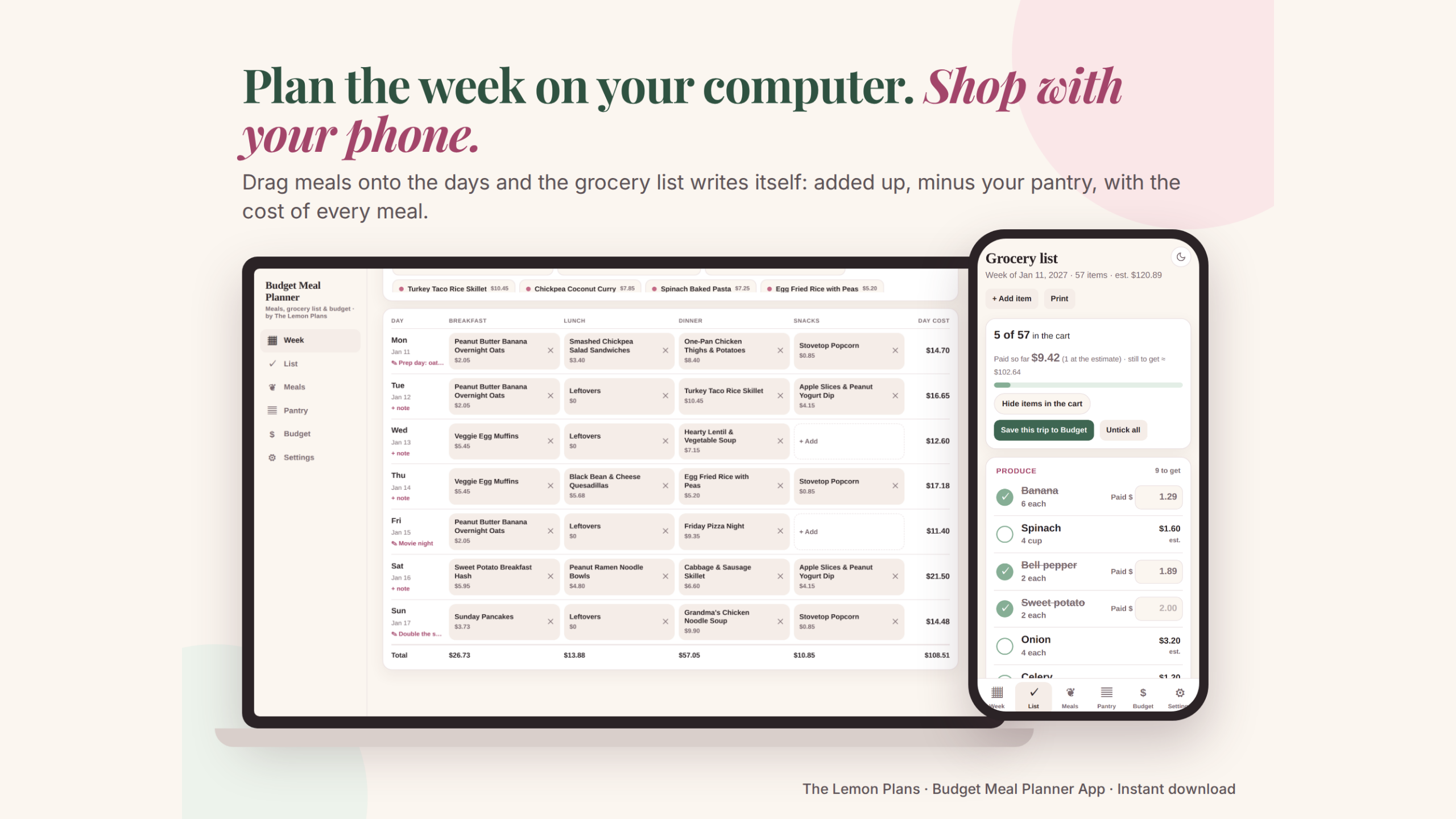
Plan on your computer. Shop with your phone.
The app works on a computer and in Chrome on Android phones. Plan on the big screen, save a backup and restore it on your phone to shop. On iPhone, use the spreadsheet in the Google Sheets app, or print the list.
Choose your format
Same planner, same math, same 20 cheap meals. The difference is where you use it. The printable PDF (weekly meal plan, grocery list and recipes) comes with every version. You choose at checkout.
Spreadsheet
For planning the week on your computer.
- Google Sheets (computer, phone and tablet)
- Excel files: blank and with a sample week
- Printable PDF
App
For the store: a grocery list you tick off on your phone.
- Opens in your browser on a computer or an Android phone
- Tick items, type what you paid
- Drag-and-drop week, works offline
- Printable PDF
- Not for iPhone (see below)
Everything
Both formats, to use where each fits best.
- The spreadsheet
- The app
- Printable PDF
Prices with the 30% launch discount, applied automatically at checkout.
Ready for your next grocery run
Use it in Google Sheets with a free Google account, on computer, phone and tablet, or open the Excel version.
Download
Get the PDF and the Excel files right after checkout. Copy the Google Sheets version to your Drive.
Plan the week
Pick your meals on Sunday. Start with our 20 cheap meals and add your family's favorites.
Shop with the list
The grocery list is ready, grouped by aisle. Tick items off as they go in the cart.
Questions
Does it work in Excel?
Yes. You get a Google Sheets version and two Excel (.xlsx) files with the same tabs and formulas: one blank and one with a sample week.
How does the grocery list know what to buy?
Each meal has its ingredients with an amount and a cost. When you put a meal on the menu, its ingredients go on the list, added up with the same item from other meals and grouped by store section. Pantry items you already have are taken off.
Can I add my own recipes?
Yes. Add up to 60 meals and 500 ingredient rows. The 20 cheap meals are a starting point you can edit or delete.
Is there a printable version?
Yes. The PDF has a printable weekly meal plan, a grocery list by store section and all 20 cheap meal recipes.
Does it work on my phone?
Yes. The Google Sheets version works in the free Google Sheets app on iPhone and Android. The app opens on computers and in Chrome on Android phones. On iPhone, Apple doesn't let browsers run app files saved on the phone, so choose the spreadsheet (or Everything) and use the Google Sheets app, or print the list.
Spreadsheet, app or everything?
The spreadsheet (Google Sheets and Excel) is best for planning the week on a computer, and it also opens in the Google Sheets app on any phone. The app is made for the store: big items you tick off with your finger and the price you paid going to your budget. Everything gets you both. They don't sync with each other, and the printable PDF comes with every version.
Where is my data saved? (app)
Only on your device, in your browser. Nothing is sent online and there is no account. That also means a new phone or computer starts empty and clearing your browser data erases it. Save a backup in Settings (the app reminds you after 7 days), keep the file in your email or cloud, and on a new device open the app and choose Settings › Restore backup.
Is it a diet plan?
No. It's a planner for your own meals and budget. The recipes are simple, budget-friendly ideas: check labels for allergies.
Spend less on groceries, starting this week
Instant download. Copy it to Google Drive or open it in Excel and plan your next week tonight.
Get the meal planner for30% launch discount applied at checkout
More from The Lemon Plans
Planners and money apps that pair well with this one.
- Budget PlannerMonthly and annual dashboards, budget vs. actual for every category, a bill tracker, savings goals and the…
- Budget LiteA free one-month budget: income, your own categories, bills with due days, a spending log and a simple…
- Paycheck Budget PlannerEvery bill matched to the paycheck that pays it, for weekly, biweekly or monthly pay. Short paychecks are…