Your whole wedding, in one app.
Budget by category, vendor deposits and due dates, guest list with RSVPs, meals and families, a floor plan of your reception room with drag-and-drop seating, keep-apart warnings and one-click auto-seat, and a checklist that counts down to the big day. No spreadsheets, no account.
- Estimated, booked and paid for 15 budget categories
- Every deposit and due date, with overdue payments in red
- Plan the room and drag your guests onto the seats
- New: seat whole families at once, keep apart who must not sit together, or auto-seat everyone
See it in 90 seconds
Plan the room. Seat every guest.
Type the room size, then drag and turn round, rectangle, banquet and head tables, the sweetheart table, dance floor, stage or DJ, buffet, bar, cake table, entrance and restrooms. Drop names onto the seats and see initials colored by side or meal. The app warns you about full tables, guests without a seat, declined guests still seated and dietary needs at each table. Print the plan or save it as a PDF, and export the guest list by table for the venue.
Try the floor plan in the demoFamilies together. Exes apart.
Add a whole family at once (or paste your list with a group column), then drag the group onto a table: everyone sits side by side. Move the whole group or take it off the table in one go. Mark who shouldn't share a table, like "Alex and Jordan", and the app warns you before you drop them together, flags the table on the plan and lists it in the printout and CSV.
Try families in the demo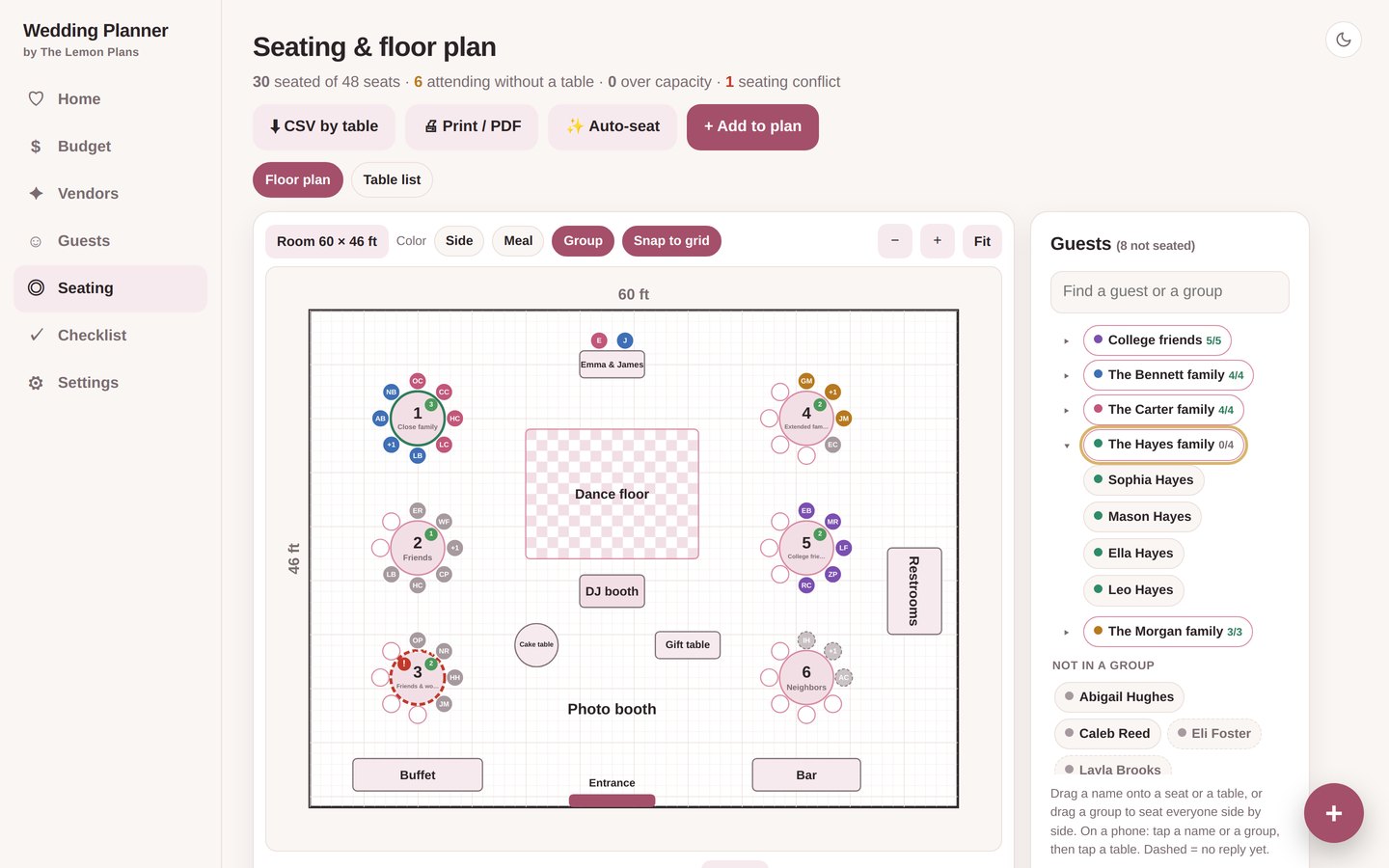
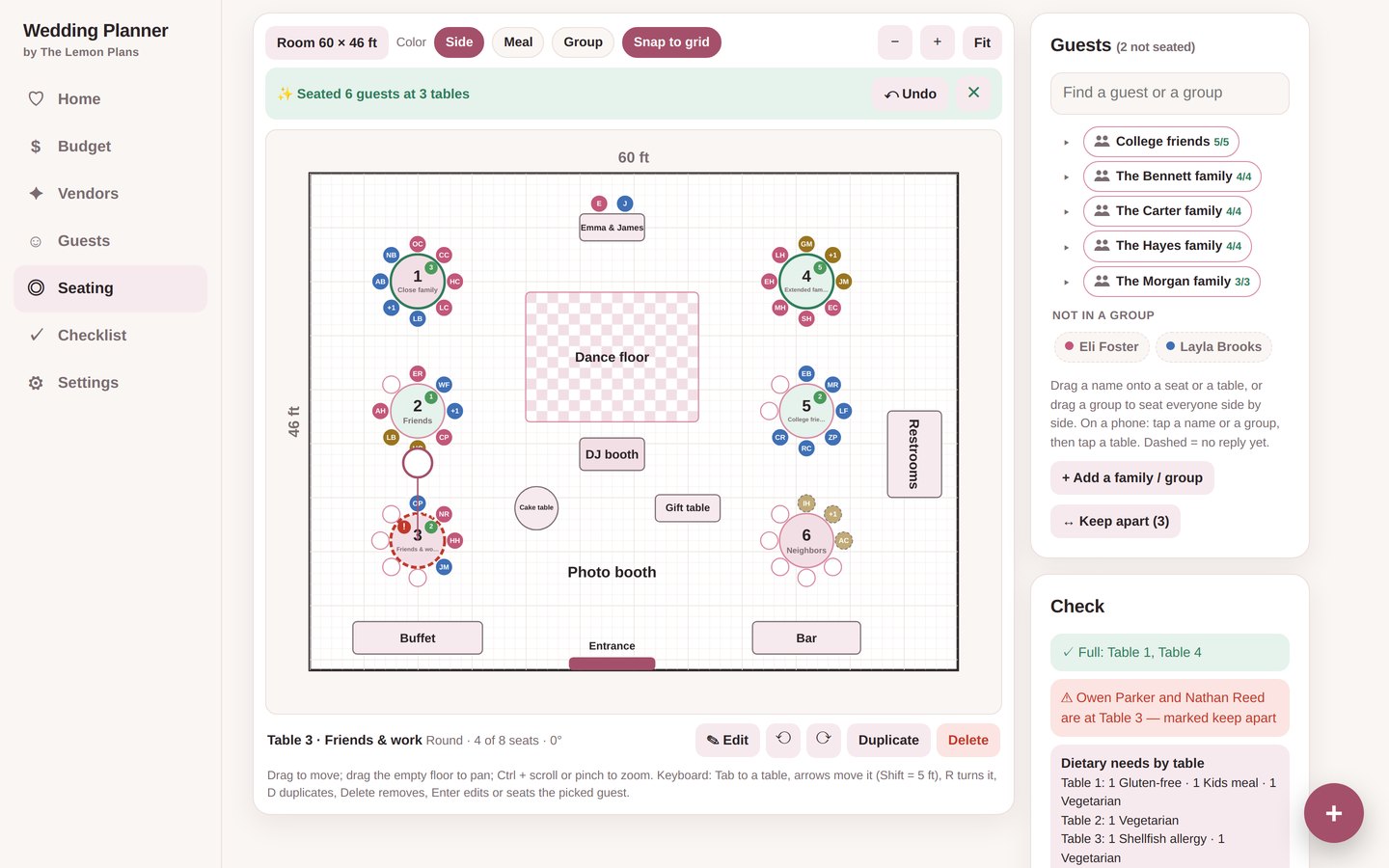
Auto-seat in one click
Let the app fill your tables: families side by side, keep-apart rules respected, each side together where there's room, no table over capacity and no lonely table of two. It tells you who couldn't be seated and why, and Undo puts everything back. Then fine-tune by hand.
Drag the names onto the tables
Add your tables, then drag each guest (or click a name, then a table). Every table shows its open seats, full tables turn green, and a table over capacity turns red. Prefer a simple list? Switch to the table list view anytime.
Try the free demoEstimated. Booked. Paid.
Your total budget starts split into 15 categories (venue 20%, catering & bar 25%, photography 10%…). Change any %, and see what's booked, paid, still to pay and left to book. Over budget turns red.
Get the app →Everything your wedding plan needs
Calm screens, big buttons and one clear view of where you stand.
Wedding budget
15 categories with a suggested split you can change, and a warning if the % don't add up to 100.
Vendors & deposits
Contract, deposit and due dates. One click logs a payment and shows what's due next.
Guest list & RSVPs
Side, group, party size, RSVP, meal, gift and thank-you note. Paste a whole list at once.
Floor plan & seating
Your room to scale: move and turn tables, seat families together, keep apart who must, auto-seat, print it or export it by table.
Countdown checklist
Days to go and 37 tasks with target dates. Overdue and this week's tasks at a glance.
Light, dark, 4 colors
Blush, Sage, Champagne or Navy. Backup, restore and CSV export for Excel or Sheets.
Never miss a deposit
Add the deposit and both due dates from each contract. Payments count toward the deposit first, then the balance. Home shows the payments coming up and flags anything overdue.
RSVPs, meals and a checklist that counts down
See who's coming, who you're still waiting to hear from and how many of each meal to order. The checklist dates every task back from your wedding day.
Ready in 10 minutes
One file that opens in Chrome, Edge, Safari or Firefox on your computer. Nothing to install.
Download
Get the app file and quick-start PDF right after checkout.
Set the basics
Your names, the date and your total budget. The budget splits itself.
Plan as you go
Add vendors and guests, log payments and lay out the room.
Questions
We just got engaged. Is it too early?
It's the best time. Set your budget and guest count first; the checklist starts at 12+ months out.
Is there a subscription?
No. You pay once and keep the app. Updates are free.
Can my partner use it too?
Yes. Download a backup and send it; your partner restores it on their computer. Take turns so the latest version wins.
Where is my data saved?
In your browser on your computer. Nothing is sent anywhere. Download a backup anytime and restore it on another computer.
Does it work on my phone?
It's made for computers right now. Phone support is on the way, free for everyone who bought.
Can it keep families together and certain guests apart?
Yes. Put guests in groups (a family, a party of friends) and drag the whole group onto a table, or mark people who shouldn't share a table: the app warns you before seating them together. Auto-seat does both for you in one click, and Undo takes it back.
Can I print the seating chart?
Yes. Print / PDF gives you the floor plan on one page and each table's guest list after it. You can also export the guest list by table to CSV for the venue or caterer.
Can I try it first?
Yes. Open the free demo with a sample wedding.
I'd rather use a spreadsheet.
We also make a Wedding Budget Planner for Google Sheets & Excel. The app is for couples who want drag-and-drop seating and everything in one screen.
Plan it together, calmly
Instant download. Set your budget tonight and see your whole wedding in one place.
Get it for30% launch discount applied at checkout